

Azure Storm入门(二)—— 事务处理
这是Azure Storm系列文章。此前的文章包括:
此前我们通过一个例子了解了Storm的基本执行流程。这里我们再通过一个例子来探讨一下Storm的事务处理部分。
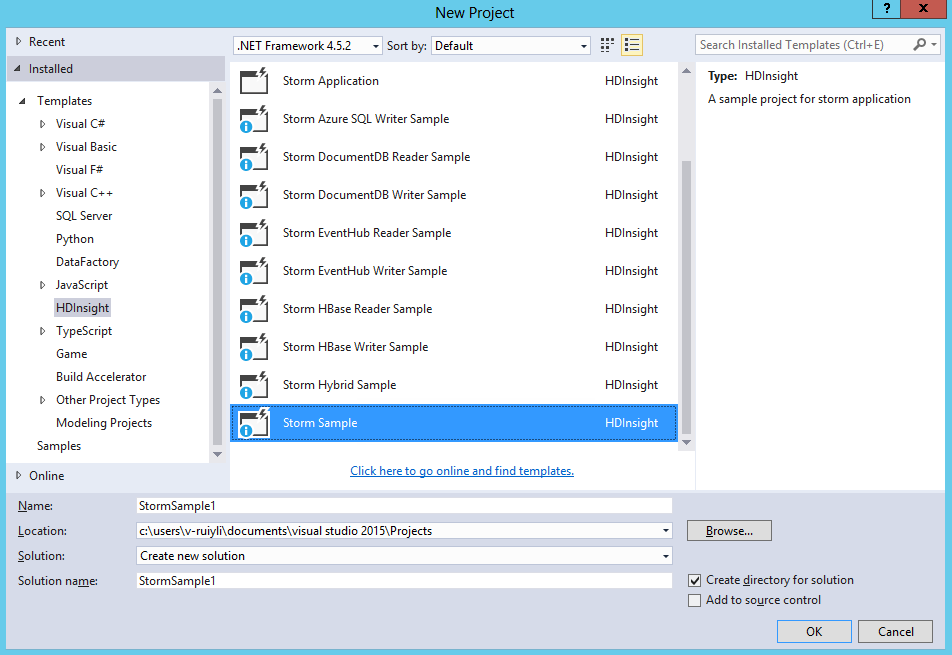
1、文件-》新建-》项目,选择HDInsight-》Storm示例,名字改为StormSample1。注意源码位置应与.sln文件在同一个文件夹下,否则可能会出错。
2、产生的文件有:
(1)Program.cs:程序入口,会有一个类HelloWorld,继承TopologyDescriptor。一旦提交到Storm中,会启动此类的GetTopologyBuilder方法。GetTopologyBuilder方法定义Storm的拓扑结构,即数据流向。
(2)Generator.cs:Spout,继承ISCPSpout类。产生数据的地方。通过这个文件随机产生一些句子发送到其他bolt(下文的Splitter)中
(3)Splitter.cs:继承ISCPBolt类,接收来自Genetator的数据。将Spout发过来的句子分割成单词,并发送数据到另外一个bolt中(下文的Counter)
(4)Counter.cs:继承ISCPBolt类,接收来自Splitter.cs的数据。统计单词出现的个数。
(5)Generator.config:Spout的配置文件。
(6)LocalTest.cs:本地测试类。本节暂时不会阐述。
3、此程序与Azure Storm入门(一)的区别主要有:
(1)Program.cs文件中,定义Spout时的代码如下:
// Set a User customized config (Generator.config) for the Generator
topologyBuilder.SetSpout(
    "generator",
    Generator.Get,
    new Dictionary<string, List<string>>()
    {
        {Constants.DEFAULT_STREAM_ID, new List<string>(){"sentence"}}
    },
    1,
    "Generator.config");
最后一句自定义了用户配置文件。
我们要修改program.cs的源码,因为默认是不支持Ack的。修改后的代码如下:
using System;
using System.Collections.Generic;
using System.IO;
using System.Threading;
using System.Linq;
using System.Text;
using System.Threading.Tasks;
using Microsoft.SCP;
using Microsoft.SCP.Topology;

/// <summary>
/// This program shows the ability to create a SCP.NET topology using C# Spouts and Bolts.
/// For how to use SCP.NET, please refer to: http://go.microsoft.com/fwlink/?LinkID=525500&clcid=0x409
/// For more Storm samples, please refer to our GitHub repository: http://go.microsoft.com/fwlink/?LinkID=525495&clcid=0x409
/// </summary>

namespace StormSample1
{
    /// <summary>
    /// Implements the TopologyDescriptor interface to describe the topology in C#,
    /// and return a ITopologyBuilder instance.
    /// This TopologyDescriptor is marked as Active
    /// </summary>
    [Active(true)]
    class HelloWorld : TopologyDescriptor
    {
        /// <summary>
        /// Use Topology Specification API to describe the topology
        /// </summary>
        /// <returns></returns>
        public ITopologyBuilder GetTopologyBuilder()
        {
            // Use TopologyBuilder to define a Non-Tx topology
            // And define each spouts/bolts one by one
            TopologyBuilder topologyBuilder = new TopologyBuilder(typeof(HelloWorld).Name + DateTime.Now.ToString("yyyyMMddHHmmss"));

            // Set a User customized config (Generator.config) for the Generator
            topologyBuilder.SetSpout(
                "generator",
                Generator.Get,
                new Dictionary<string, List<string>>()
                {
                    {Constants.DEFAULT_STREAM_ID, new List<string>(){"sentence"}}   //定义输出格式
                },
                2,              //设置该Task的executor(进程)的数量
                "Generator.config",     //自定义配置
                true);          //允许ack

            topologyBuilder.SetBolt(
                "splitter",
                Splitter.Get,
                new Dictionary<string, List<string>>()
                {
                    {Constants.DEFAULT_STREAM_ID, new List<string>(){"word", "firstLetterOfWord"}}  //定义输出格式
                },
                2,
                true).shuffleGrouping("generator");            //定义输入,以及输入的分组方式

            // Use scp-field-group from Splitter to Counter,
            // and specify the second field in the Output schema of Splitter (Input schema of Counter) as the field grouping target
            // by passing the index array [1] (index start from 0)
            topologyBuilder.SetBolt(
                "counter",
                Counter.Get,
                new Dictionary<string, List<string>>()
                {
                    {Constants.DEFAULT_STREAM_ID, new List<string>(){"word", "count"}}
                },
                2,
                true).fieldsGrouping("splitter", new List<int>() { 1 });

            // Add topology config
            topologyBuilder.SetTopologyConfig(new Dictionary<string, string>()
            {
                {"topology.kryo.register","[\"[B\"]"}
            });

            return topologyBuilder;
        }
    }
}
(2)在Generagor.cs文件中,增加了4个字段:
private const int MAX_PENDING_TUPLE_NUM = 10;    //最大同时处理的数目

private bool enableAck = false;             //是否允许Ack,在Generagor的构造函数中通过读取配置文件赋值
private long lastSeqId = 0;
private Dictionary<long, string> cachedTuples = new Dictionary<long, string>();    //将所有已经发出去的句子存储起来
(3)在Generagor.cs的构造函数中,parms是在Program.cs中传入的,即本节的第(1)点。构造函数如下所示:
public Generator(Context ctx, Dictionary<string, Object> parms = null)
{
    Context.Logger.Info("StormSample1, Generator constructor called");
    this.ctx = ctx;

    // Demo how to get User customized config from parms
    if (parms != null && parms.ContainsKey("UserConfig"))
    {
        this.cfg = (Configuration)parms["UserConfig"];
    }

    if (cfg != null)
    {
        //这里展示如何获得用户自定义信息
        Context.Logger.Info("StormSample1, Generator " + string.Format("New \"Generator\" instance created with config setting: {0}={1}.", "BatchSize", cfg.AppSettings.Settings["BatchSize"].Value));
    }

    // Declare Output schema
    Dictionary<string, List<Type>> outputSchema = new Dictionary<string, List<Type>>();
    outputSchema.Add("default", new List<Type>() { typeof(string) });
    this.ctx.DeclareComponentSchema(new ComponentStreamSchema(null, outputSchema));

    // Demo how to get pluginConf info and enable ACK in Non-Tx topology
    if (Context.Config.pluginConf.ContainsKey(Constants.NONTRANSACTIONAL_ENABLE_ACK))
    {
        //这里展示如何判断是否支持Ack
        enableAck = (bool)(Context.Config.pluginConf[Constants.NONTRANSACTIONAL_ENABLE_ACK]);
    }
    Context.Logger.Info("StormSample1, Generator enableAck: {0}", enableAck);
}
一定要修改Program的代码,否则不会支持Ack!
(4)Generator.cs的NextTuple函数如下。Spout 必须存储所发出数据的元数据,这样,在失败时,就可以检索和发出数据。此示例所发出的数据太少,因此为了重放,每个 Tuple 的原始数据都会存储在字典中。
public void NextTuple(Dictionary<string, Object> parms)
{
    Thread.Sleep(1000 * 60);
    Context.Logger.Info("StormSample1, Generator NextTuple enter");
    string sentence;

    if (enableAck)
    {
        //这里当未处理完毕的Tuple大于给定数值时,不再发送。
        //利用成员变量存储已经发送过的sentence,其中序列id作为唯一标记。
        if (cachedTuples.Count <= MAX_PENDING_TUPLE_NUM)
        {
            lastSeqId++;
            sentence = sentences[rand.Next(0, sentences.Length - 1)];
            Context.Logger.Info("StormSample1, Generator Emit: {0}, seqId: {1}", sentence, lastSeqId);
            this.ctx.Emit(Constants.DEFAULT_STREAM_ID, new Values(sentence), lastSeqId);
            cachedTuples[lastSeqId] = sentence;
        }
        else
        {
            // if have nothing to emit, then sleep for a little while to release CPU
            Thread.Sleep(50);
        }
        Context.Logger.Info("StormSample1, Generator cached tuple num: {0}", cachedTuples.Count);
    }
    else
    {
        sentence = sentences[rand.Next(0, sentences.Length - 1)];
        Context.Logger.Info("StormSample1, Generator Emit: {0}", sentence);
        this.ctx.Emit(new Values(sentence));
    }

    Context.Logger.Info("StormSample1, Generator NextTx exit");
}
(5)Generator.cs中,Ack方法不再是空,其代码如下。当每个bolt完成时,调用ack函数。当其中一条拓扑路径完成时,会激发此函数的调用。因此我们可以通过seqId来判断哪个句子完成统计了。这段代码将已经完成的Tuple删除。
public void Ack(long seqId, Dictionary<string, Object> parms)
{
    Context.Logger.Info("StormSample1, Generator Ack, seqId: {0}", seqId);
    bool result = cachedTuples.Remove(seqId);
    if (!result)
    {
        Context.Logger.Warn("StormSample1, Ack(), Generator remove cached tuple for seqId {0} fail!", seqId);
    }
}
(6)Generator.cs中,Fail方法不再是空,其代码如下。当Tuple发出的时间超过用户自定义的时间,却仍没有收到确认消息,那么就调用此函数。这个函数的作用重发数据。
public void Fail(long seqId, Dictionary<string, Object> parms)
{
    Context.Logger.Info("StormSample1, Generator Fail, seqId: {0}", seqId);
    if (cachedTuples.ContainsKey(seqId))
    {
        string sentence = cachedTuples[seqId];
        Context.Logger.Info("StormSample1, Generator Re-Emit: {0}, seqId: {1}", sentence, seqId);
        this.ctx.Emit(Constants.DEFAULT_STREAM_ID, new Values(sentence), seqId);
    }
    else
    {
        Context.Logger.Warn("StormSample1, Fail(), Generator can't find cached tuple for seqId {0}!", seqId);
    }
}
(7)Splitter.cs文件的execute代码如下。首先获得来自generagor的数据,然后模拟随机处理失败和延时。这里如果成功,调用Ack方法,通知成功。若处理失败,调用Fail方法。若延时,则会自动调用Fail方法。
public void Execute(SCPTuple tuple)
{
    Context.Logger.Info("StormSample1, Splitter Execute enter");

    string sentence = tuple.GetString(0);
    foreach (string word in sentence.Split(' '))
    {
        Context.Logger.Info("StormSample1, Splitter Emit: {0}", word);
        this.ctx.Emit(Constants.DEFAULT_STREAM_ID, new List<SCPTuple> { tuple }, new Values(word, word[0]));
    }

    if (enableAck)
    {
        if (Sample(50)) // this is to demo how to fail tuple. We do it randomly
        {
            Context.Logger.Info("StormSample1, Splitter fail tuple: tupleId: {0}", tuple.GetTupleId());
            this.ctx.Fail(tuple);
        }
        else
        {
            if (Sample(50)) // this is to simulate timeout
            {
                Context.Logger.Info("StormSample1, Splitter sleep {0} seconds", msgTimeoutSecs + 1);
                Thread.Sleep((msgTimeoutSecs + 1) * 1000);
            }
            Context.Logger.Info("StormSample1, Splitter Ack tuple: tupleId: {0}", tuple.GetTupleId());
            this.ctx.Ack(tuple);
        }
    }

    Context.Logger.Info("StormSample1, Splitter Execute exit");
}
(8)同样,Counter.cs中的execute方法在处理成功后也会调用Ack方法。这里会传播到Generator,让其调用Ack方法。
public void Execute(SCPTuple tuple)
{
    Context.Logger.Info("StormSample1, Counter Execute enter");

    string word = tuple.GetString(0);
    int count = counts.ContainsKey(word) ? counts[word] : 0;
    count++;
    counts[word] = count;

    Context.Logger.Info("StormSample1, Counter Emit: {0}, count: {1}", word, count);
    this.ctx.Emit(Constants.DEFAULT_STREAM_ID, new List<SCPTuple> { tuple }, new Values(word, count));

    if (enableAck)
    {
        Context.Logger.Info("StormSample1, Counter Ack tuple: tupleId: {0}", tuple.GetTupleId());
        this.ctx.Ack(tuple);
    }

    // log some info to out file for bvt test validataion
    if (taskIndex == 0) // For component with multiple parallism, only one of them need to log info
    {
        string fileName = @"..\..\..\..\..\HelloWorldOutput" + Process.GetCurrentProcess().Id + ".txt";
        FileStream fs = new FileStream(fileName, FileMode.Append);
        using (StreamWriter writer = new StreamWriter(fs))
        {
            writer.WriteLine("word: {0}, count: {1}", word, count);
        }
    }
    Context.Logger.Info("StormSample1, Counter Execute exit");
}
目前我实验一下,发现有以下几点应该注意。
(1)要想支持Ack机制,需要在创建拓扑的时候指定支持ACK,否则不能执行Ack机制。
(2)读取的topology.message.timeout.secs延迟不正确。我在StormUI中看到的这个值为30,但是程序日志却为1000。可以在Program.cs中设置config。
(3)创建Spout/Bolt时,可以指定并行数目。这个并行数目是指执行的进程个数。如果执行Spout为2,那么构造函数就会执行两次。
(4)目前Linux的Storm不支持VS提交作业。只有Windows下的Storm支持。
0 条评论